
Hebrew Cursive Generator: Alphabet Chart and Handwritten Pages
Type or paste Hebrew, see it written in true Hebrew cursive from right to left, and download the whole page as PDF or PNG. The full alphabet chart is below.
- 1 Write your text
- 2 Generate
- 3 Download

How to Write in Hebrew Cursive: Type It, See It, Download It
To write in Hebrew cursive here, type or paste Hebrew into the box at the top of this page and the page beside it redraws in cursive, from right to left. It is the quickest way to see your own words the way an Israeli would write them.
Start with something you actually need: a homework sentence, a note to a friend or a line from a song. Choosing your own words beats copying a chart, because you see the letters where they really appear, including the final forms at the end of each word.
Then choose the paper, the ink color and the size, and press Generate. Lined paper makes a good model to copy from. Download every page as one PDF or the current page as an image, and keep it next to you while you write the same text by hand.
Hebrew cursive is written from right to left like print Hebrew, so a line starts at the right margin. Numbers still read from left to right inside the line, and the generator keeps that order for you.
1.Type or paste Hebrew
Your own sentence, note or homework.
2.See it in cursive
The page redraws from right to left.
3.Choose paper and size
Lined paper makes a good model.
4.Download or print
One PDF, or the page as an image.
Hebrew Cursive Alphabet: All 22 Letters and 5 Final Forms
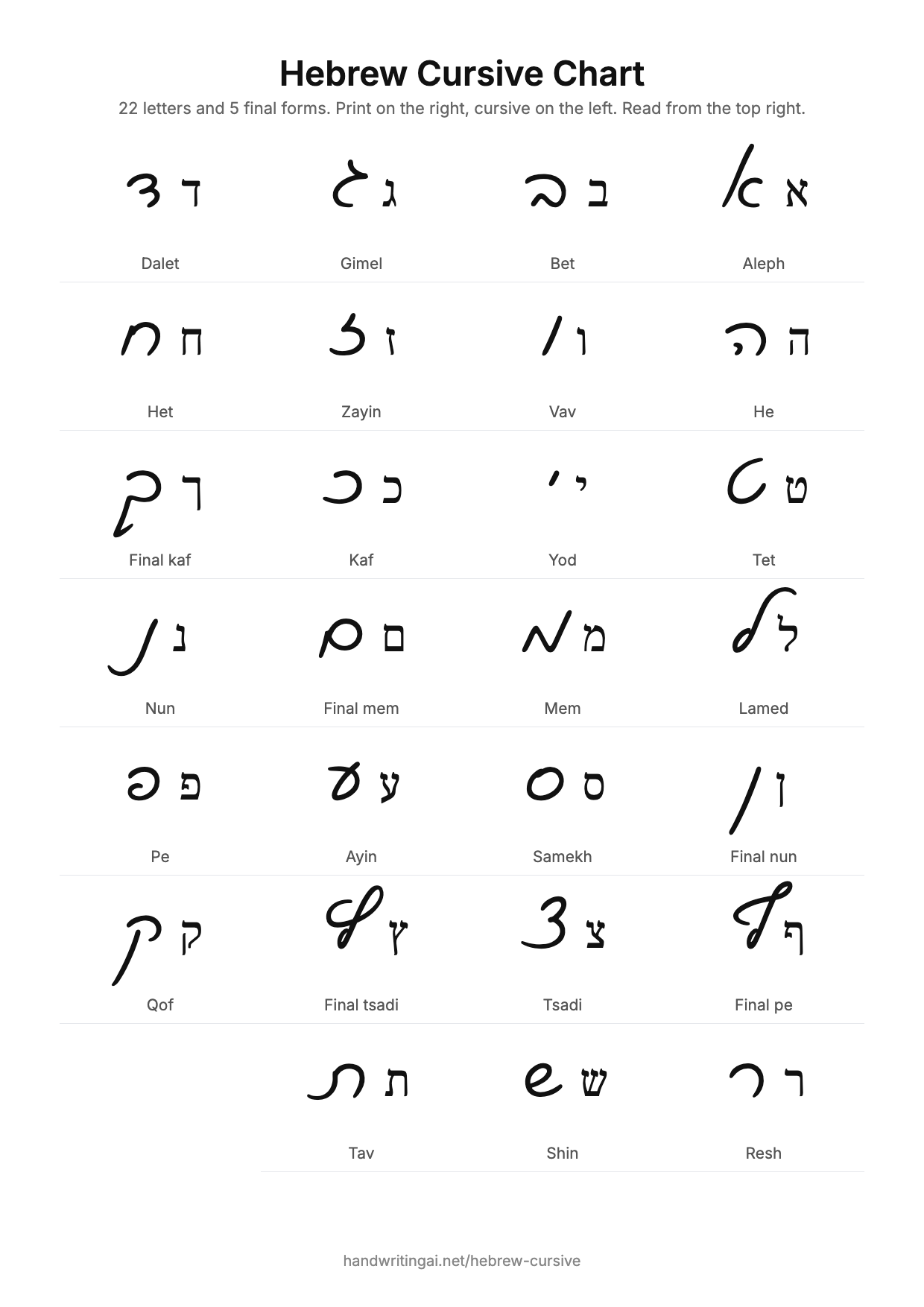
The Hebrew cursive alphabet has 22 letters and 5 extra final forms, the same letters as print Hebrew drawn in a quicker, rounder hand. The table shows each one in print beside its cursive form.
Final forms replace five letters at the end of a word: kaf becomes final kaf, and mem, nun, pe and tsadi do the same. You need them from your first day of writing, since common words end in them, so learn each one together with its regular form.
There are no capital letters to learn. That makes the job smaller than it first looks: 27 shapes in total, against 52 for the English cursive alphabet. Most learners get through them in short sessions over a few weeks.
Unlike English cursive, most Hebrew cursive letters do not join. Each stands alone with a small gap beside its neighbour, so you can learn them one at a time and read a word as soon as you know its letters.
Aleph
Bet
Gimel
Dalet
He
Vav
Zayin
Het
Tet
Yod
Kaf
Final kaf
Lamed
Mem
Final mem
Nun
Final nun
Samekh
Ayin
Pe
Final pe
Tsadi
Final tsadi
Qof
Resh
Shin
Tav
Cursive Hebrew Letters That Look Nothing Like Print
Several cursive Hebrew letters look nothing like their print forms, which is why someone who reads a textbook easily can stall on a handwritten note. The aleph, gimel, dalet, lamed and qof are the first ones to learn on their own.
A handful of pairs also look alike in cursive. Vav and final nun differ mainly in how far they drop below the line. Samekh and final mem are both round. When a word looks wrong, check these pairs first, and remember that final mem appears only at the end of a word.
Height helps you tell letters apart. Lamed rises above the line, while qof and the final forms of kaf and nun drop below it. If you keep those heights clear, your writing stays readable even when you speed up.
To practise, write one confusing pair on a line, then a short word that uses each of them. Type those same words into the generator and compare. Seeing your letter next to a clean model is the fastest way to find what needs fixing.
| Letter | Cursive | |
|---|---|---|
| Aleph | א | א |
| Gimel | ג | ג |
| Dalet | ד | ד |
| Lamed | ל | ל |
| Qof | ק | ק |
| Vav and final nun | ו ן | ו ן |
| Samekh and final mem | ס ם | ס ם |
Hebrew Aleph Bet in Cursive, in Order
The Hebrew aleph bet in cursive runs in the same order as print, from aleph to tav. Learning it in order helps you recite it and look words up, while learning it in shape groups helps your hand.
Use both. Say the aleph bet in order until you know the sequence, then group the letters by how they feel to write, for example the round ones together and the ones that drop below the line together. The order below is the one found in every dictionary.
A short daily round works well: copy five letters in order while saying their names, then write one short word that uses them. Move on to the next five the following day, and go back over the earlier groups before starting new ones.
Type the whole aleph bet into the generator to get your own practice page at any size, on lined paper. It takes a moment, and you can print a new copy whenever your first one is full.
א ב ג ד ה ו ז ח ט י כ ל מ נ ס ע פ צ ק ר ש ת
Hebrew Cursive Chart You Can Print
This Hebrew cursive chart shows all 27 letter forms on one A4 page, with print and cursive side by side. Download the image for free and print it, or keep it on your phone.
Put it where you actually do your Hebrew, inside a notebook or beside your desk, rather than saving it to a folder you will not open again. A chart earns its place in the first weeks, when you need to glance at it every few words.
Each row gives the letter name, the print form and the cursive form. Print it at full size, since the small differences between similar letters are much easier to see on a large page than on a phone screen.
Once you know most of the chart, stop checking it first. Try to write each word from memory and only look up a letter when you get stuck, because that effort of remembering is what makes the shapes stay.
Hebrew Script: Cursive, Print and Biblical Styles
Hebrew script comes in three styles you will meet most often: square print in books and on signs, cursive in everyday handwriting, and the same square letters with vowel points and cantillation in biblical texts. All three share one alphabet.
Print is what you see in books, on screens and on signs. Cursive is what people write by hand in notes, on whiteboards and in forms. Israelis read both without thinking, so learners need both as well: print to read, cursive to write and to read other people.
Biblical and prayer book texts use the square letters with vowel points, the small marks that show the vowels. Everyday cursive leaves those out, so a handwritten note looks plainer than a page of a siddur. Rashi script is a fourth, separate style, used mainly for commentary in religious texts.
If you started with biblical Hebrew, the print letters will feel familiar and the cursive will feel new. Treat cursive as a second alphabet for your hand rather than a variation of what you know, and it comes more quickly.
בראשית
Cursive, everyday handwriting
בראשית
Print, books and signs
בְּרֵאשִׁית
Biblical, with vowel points
Hebrew Cursive Handwriting: How Israelis Write
Hebrew cursive handwriting is how Israelis normally write by hand, and children usually learn it in their first years of school after print. It grew out of medieval Ashkenazi handwriting and is now the everyday hand of the language.
Real handwriting varies. People drop strokes, tilt their letters and develop their own shortcuts, just as English writers do, so a friend’s note can look quite different from a chart. Once you know the standard forms, reading several people’s handwriting is the next step.
Print letters do appear in handwriting too, on forms where block letters are requested or on signs. Writing print in an Israeli classroom or a letter, however, marks you as a beginner, which is one good reason learners move to cursive early.
Adding natural variation in the generator shows how the same letter changes slightly from word to word. Use it to make a page look more like real writing, and to get used to reading letters that are not perfectly identical.
נועה היקרה,
תודה על הספר. נפגש ביום שלישי בבוקר?
להתראות, דני
How to Type in Cursive Hebrew
To type in cursive Hebrew, add a Hebrew keyboard to your device, then display the text in a cursive Hebrew font. A keyboard only enters letters, and the font decides how they look.
On a phone or computer, add Hebrew in the language or keyboard settings. Typing then produces ordinary Hebrew letters, which is why a message in a chat app always looks like print: the app chooses the font, and you cannot change it for the person reading.
To get cursive, paste the text somewhere that lets you set the font. On this page it happens automatically: paste your Hebrew in the box and the page draws it in cursive, then export it as an image or a PDF that looks the same on any device.
In a word processor you can install a cursive Hebrew font and select it for your text. Set the paragraph direction to right to left as well, otherwise punctuation can end up at the wrong end of the line.
1.Add a Hebrew keyboard
In your language or keyboard settings.
2.Type your text
It appears in ordinary print letters.
3.Paste it here
The page draws it in cursive.
4.Export the page
An image or PDF looks the same everywhere.
Hebrew Cursive Font
The Hebrew cursive font on this page is Ktav Yad, drawn by Maxim Iorsh for the open source Culmus project. It uses the real cursive letterforms rather than a slanted version of print.
That difference is the first thing to check in any Hebrew cursive font. Many fonts sold as Hebrew handwriting are print shapes drawn with a pen, and they will not teach you the letters people actually write. Compare the aleph and the lamed with the chart above and it shows at once.
We also offer Playpen Sans Hebrew, a friendly print style hand from Google Fonts, for when you want handwriting that a beginner can read easily. Switch between the two in the font list and the page redraws straight away.
Ktav Yad is free under the GNU GPL, and you can download it from the Culmus project to use on your own computer. It covers the letters, final forms, digits and common punctuation you need for everyday text.
דג סקרן שט בים
Ktav Yad, true cursive
דג סקרן שט בים
Playpen Sans Hebrew, print style hand
Mazel Tov in Hebrew Cursive
Mazel tov in Hebrew is מזל טוב, two short words that you can write in cursive on a card in a minute. The table shows this and other greetings people look up for cards and invitations.
Mazel tov literally means good fortune, and it is said as congratulations, at a wedding, a bar or bat mitzvah, a new baby or any other happy event. Notice the final letters in other greetings as you copy, since they change shape at the end of the word.
Type your greeting into the generator, pick a size and download it as an image for a card, or use it as a model and write it yourself with a good pen. A handwritten line in Hebrew stands out on a card, even when the rest of the message is in English.
If you are adding a greeting to something permanent, such as a tattoo or an engraving, have a Hebrew speaker check the spelling and direction first. A reversed line is the most common mistake, and it is easy to miss if you do not read Hebrew.
| Greeting | In cursive | Meaning |
|---|---|---|
| Mazel tov | מזל טוב | Congratulations |
| Shabbat shalom | שבת שלום | A peaceful Sabbath |
| Shana tova | שנה טובה | A good new year |
| Chag sameach | חג שמח | A happy holiday |
| Toda raba | תודה רבה | Thank you very much |
Simple pricing
Every font, paper and ink is free to use in the editor. Pay only when you want a watermark-free export: buy credits once, which unlock every feature and are spent as you use them, or subscribe for a large monthly allowance.
Buy credits, pay once
Credits unlock every feature. No subscription, pay only when you use them.
24 credits, 12 watermark-free exports
50 credits, 25 watermark-free exports
120 credits, 60 watermark-free exports
300 credits, 150 watermark-free exports
What's included
- Every feature: AI writing, personalized letters, your own font, import and saved documents
- Watermark-free exports in PDF, PNG or JPEG, 2 credits per document
- One price per document, not per page (up to 60 pages)
- Type a topic and AI writes it in handwriting, 1 credit a draft
- Personalized letters, 1 credit per letter
- Credits never expire
- One-time payment, no subscription
- No auto-renew, nothing to cancel
- Credits added to your account instantly
Hebrew Cursive FAQ
The letters, the font, downloading, and reading handwritten Hebrew.
It is real cursive. Ktav Yad draws the letterforms Israelis write by hand, which differ clearly from the square letters in books. Playpen Sans Hebrew is also in the font list if you want a print style hand.
Yes, like all Hebrew. Lines start at the right and run to the left, and numbers inside a line still read from left to right. The generator sets this up for you, in the preview and in the download.
Aleph, gimel, dalet, lamed and qof surprise most learners. Compare them on the chart first, then learn the look-alike pairs such as vav and final nun, or samekh and final mem.
Yes. Cursive is the normal everyday hand in Israel for notes, school work and forms, and children usually learn it in their first years of school. Block letters are kept for forms that ask for them and for signs.
Everyday cursive leaves them out, as most modern Hebrew does, so the cursive font here writes the consonants. Vowel points belong mainly to children’s books, poetry and religious texts in square letters.
No. Rashi script is a separate semi-cursive style used mainly for printed commentary in religious texts. Modern cursive Hebrew is a handwriting, and its letter shapes differ from Rashi script.
If you already read print Hebrew, a few weeks of short daily practice is usually enough to recognise all the letters. Reading other people’s handwriting at speed takes longer, since everybody develops their own shortcuts.
Press Generate, then export every page as one PDF or the page on screen as a PNG, after signing in with a free account. Free downloads carry a small watermark; a clean download costs credits, with no subscription, or comes with a plan.
Yes. You can type and preview without an account, a free account lets you download the page, and the alphabet chart is a free image. Only a watermark free page download needs credits or a plan.
Yes. Download the chart image from the chart section and print it at full size on A4 or Letter. It shows the letter name, the print form and the cursive form for all 27 shapes.
Yes for the plain letters, since Yiddish uses the same alphabet and the same cursive hand. Type a double letter as two separate letters. Vowel points used in some Yiddish spellings are not drawn by the cursive font.
Yes. Digits, the comma, the period, question and exclamation marks, the maqaf and the geresh are all in the cursive font, so an ordinary note comes out complete.